 Quizproof
My quiz doesn't show on my store
Most often the quiz isn't published, the block has no quiz chosen, or the Quiz popups embed is off in your published theme. Open the theme editor on the page: a Quiz block that shows nothing on your store tells you why there. After publishing, pausing or resuming, wait up to a minute and reload.
Check in this order#
Go to Quizzes. The quiz's status must be Live. Draft means it has never been published; Paused means Quiz blocks and buttons show nothing, and quiz links and the quiz page say "This quiz is paused."
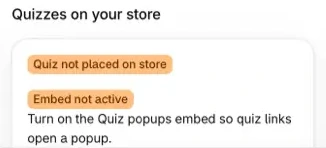
Go to Home and look at Quizzes on your store. It shows Embed active or Embed not active, and how many Quiz blocks are placed. Use Activate or Add quiz block to open the theme editor at the right place, then save there.
Open the theme editor (Online Store › Themes › Customize) on the page with the block and select it. If the quiz can't be shown, the block says why instead of showing the first question (see the table below).
Wait up to a minute, then reload your store page. Shopify can keep showing the page as it was before your change for a short while, and no app can clear it sooner.
What the theme editor says on a block#
On your live store these blocks show nothing at all; only the theme editor shows the reason.
| The block says | Why | Fix |
|---|---|---|
| "Choose a quiz in block settings" | No quiz is chosen, or the chosen one no longer exists | Choose a quiz in the block's Quiz setting. Only published quizzes are listed. |
| "Not published" | The quiz has never been published | Publish it in Quizproof. |
| "Paused" | The quiz is paused | Resume it on the quiz's page, under Publication. |
| "Deleted" | The quiz was archived in Quizproof | Choose another quiz in the block's settings. |
| "Publish again" | The quiz was published before quiz blocks existed | Publish it again. |
Home counts every Quiz and Quiz button block in your published theme, including blocks with no quiz chosen, so Quiz placed on store doesn't guarantee that a quiz is showing.
If it doesn't work#
Home says Embed not active or Quiz not placed on store, but I added it. Home checks your published theme only. A block or embed saved in another theme doesn't count until that theme is published. Make sure you chose Save in the theme editor, then come back to Home: it checks again.
A link to the quiz does nothing. Links like
#quizproof=your-quiz-handleand?qp=your-quiz-handleneed the Quiz popups embed turned on (or a Quiz button block on the same page). Check that the handle is copied exactly from the quiz's page in Quizproof (it shows Handle under Summary): lowercase letters, digits and hyphens only. A handle with capital letters or spaces doesn't work.The popup says "This quiz isn't available right now." The handle in the link doesn't match a published quiz, the quiz is archived, or your store is past 120% of its monthly completions. Check the handle, and check Settings › Plan and billing. See Plans and limits. If every quiz on your store says this and you recently changed the app's proxy URL, see the next point.
Every quiz says "This quiz isn't available right now." after I changed the app's proxy URL. Your theme still calls the old address. Open any quiz page once at the new address, for example
/apps/your-new-path/q/your-quiz-handle. Quizproof learns the new path from that visit and points your blocks and links at it; after a short wait, reload your store page. You change the address in Shopify under Settings › Apps › Quizproof › App Proxy URL (Customize URL).The Quiz button disappeared. Past 120% of your monthly completions, Quiz buttons are hidden and new shoppers see "This quiz isn't available right now." in blocks and popups. Shoppers who already started can finish. They come back when the next month starts or you change plans.
Shoppers see "This quiz was updated. Please start again." You published a new version while they were on a page that still had the previous one. Start again loads the new version.
I published, but the store still shows the old version. On the quiz's page, Publication says "the storefront still shows" the earlier version until Shopify has the new one. Wait a minute and reload.
In the theme editor the quiz shows its first question but nothing responds. After you change a section, the theme editor shows a static preview of the first question. Reload the preview, or check the live store.
After reinstalling Quizproof, my blocks show nothing. The quiz's page shows "Choose this quiz again in your theme". In the theme editor, select each Quiz block and Quiz button and choose the quiz again, then choose Done on that banner. A reinstall also puts a customized proxy URL back to Shopify's default; Quizproof notices and switches to it on its own, so you don't need to do anything for that.
The quiz page shows Shopify's "page not found". The quiz page's address follows your store's app proxy path:
/apps/quizproof/q/your-quiz-handleby default, but a store can have another, such as/apps/quizproof-1. Use View on store on the Quizzes page to open it: it uses the path Quizproof last saw on your store. Right after you change the proxy URL, it can still show the old one until a shopper or you open a quiz at the new address.The quiz says "Something went wrong. Please try again." Quizproof couldn't be reached. Use Try again if the quiz shows it, or reload the page; if it keeps happening, email us.
Related#
Questions? Email support@quizproof.app.
Menu paths such as Settings › Privacy are inside Quizproof: in your Shopify admin, open Apps › Quizproof. Where an article means Shopify's own settings, it says so.
Something unclear? Email support@quizproof.app. We aim to reply within 1 business day.
More in Troubleshooting: A shopper sees no matching products, What Quizproof doesn't do yet