 Quizproof
Draft a quiz with AI
Go to Quizzes and choose Draft with AI. Fill in a short brief and choose Draft quiz. AI writes a draft quiz from your attributes; you decide every rule it proposes, read its copy and publish yourself. AI never publishes anything, and nothing it writes reaches shoppers until you approve it.
Before you start: AI writes rules from your attributes, so create them under Settings › Attributes and approve their values in Review attributes first.
Write the brief#
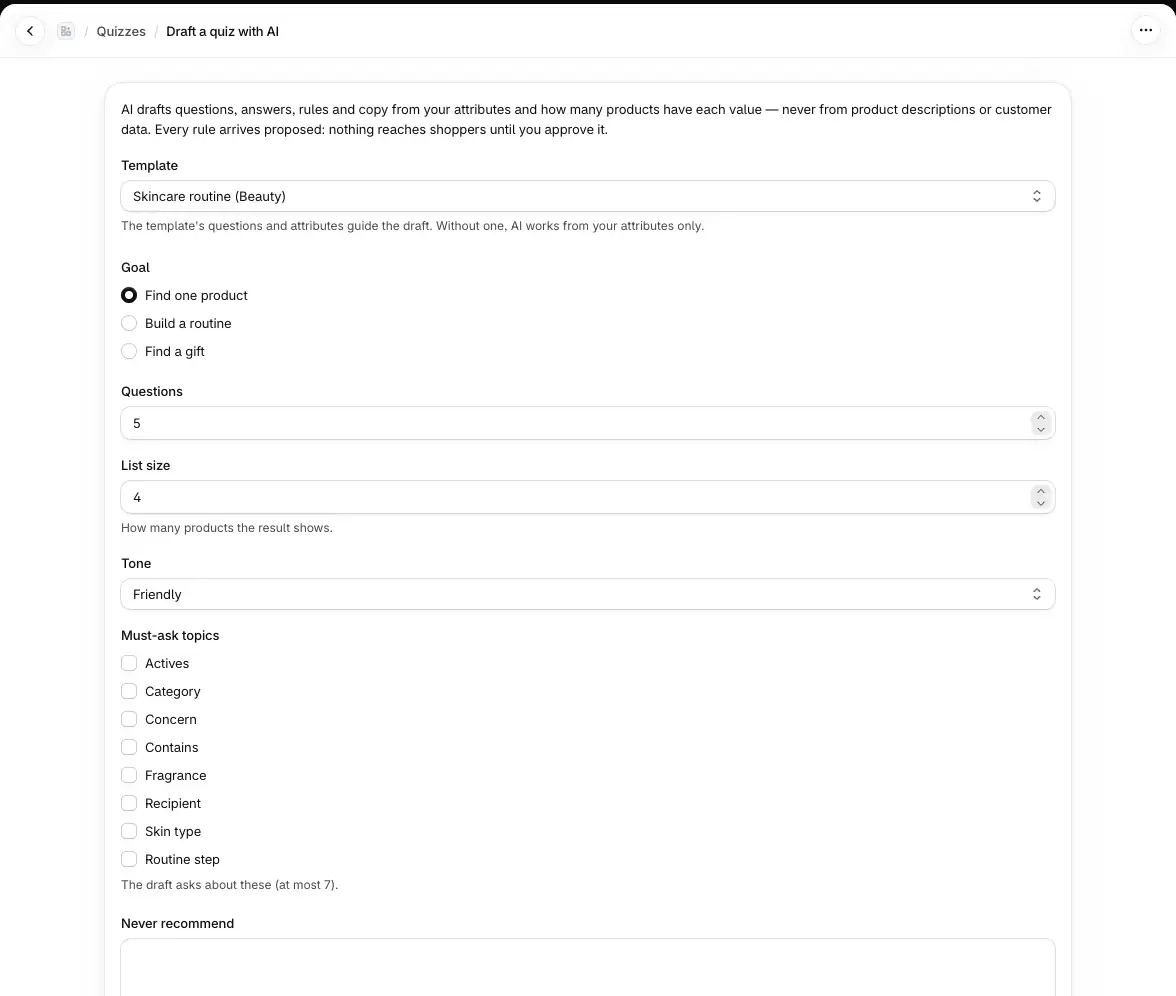
Go to Quizzes › Draft with AI.
Fill in the brief:
Template (optional): the template's questions and attributes guide the draft. With No template, AI works from your attributes only.
Goal: Find one product, Build a routine or Find a gift.
Questions: 3 to 7.
List size: how many products the result shows, 1 to 12. For a routine, Routine steps instead: 2 to 5.
Tone: Friendly, Calm, Direct, Playful or Expert.
Must-ask topics: up to 7 of your attributes the quiz must ask about.
Never recommend: up to 10 items, one per line, for example "fragrance for sensitive skin".
Quiz name (optional).
Choose Draft quiz. The page shows each stage: drafting, checking the draft, repairing problems the checks found, creating the quiz.
When it is ready, the editor opens on the Review AI draft tab. The quiz is also on Quizzes with an AI draft badge.
What AI uses and what the draft contains#
AI reads your product-level attributes (not numbers) and how many products have each value, plus the brief and the template's outline. It never reads your product descriptions or any customer data for a draft, so the size of your catalog doesn't matter.
The draft contains choice questions with their answers, rules (show products where, leave out, never show, rank higher), the result (a list or a routine), the no-match message and result copy. Before you see it, Quizproof checks every answer path and lets AI repair the draft up to twice. Anything AI suggested that your catalog can't support, such as a value no product has, is dropped and listed.
Review the draft#
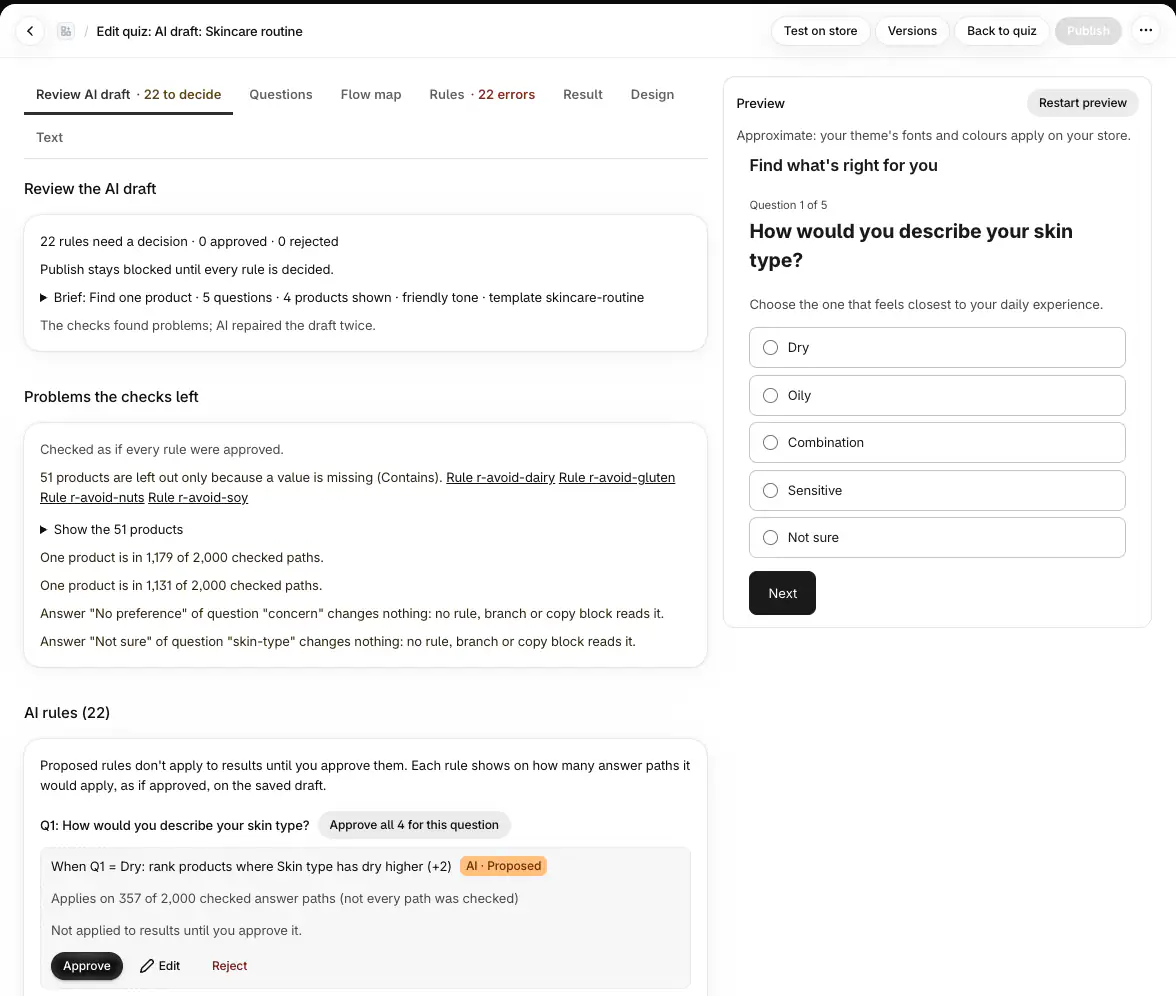
The Review AI draft tab shows:
how many rules need a decision, and your brief;
Problems the checks left, checked as if every rule were approved;
the AI rules, grouped by question. Each rule shows on how many answer paths it would apply. Choose Approve, Edit or Reject, or approve all of a question's rules at once;
Draft copy: AI wrote the questions, answers and result copy. Read them, edit them in the other tabs, then choose Mark copy reviewed.
Every rule arrives proposed. Publishing stays blocked until every rule is decided; the editor says "3 rules need a decision", for example. Rules that leave out products by a safety attribute (allergens, ingredients, or any attribute another quiz of yours uses in a never-show rule) are always drafted as Never show (hard exclude) rules, and products without data for them are left out too.
AI suggestions for attribute values#
On an attribute's page (Settings › Attributes), Suggest values with AI fills in values for products your sources leave empty, read from each product's title, tags, options, metafields and description. Suggestions wait in Review attributes with an AI badge. AI only picks from the attribute's allowed values, only for product-level attributes, and is never used for allergens, ingredients or anything a quiz uses in a Never show (hard exclude) rule.
Plans and the monthly allowance#
AI drafting and suggestions are on every plan. Each store has a monthly AI allowance, shared by drafts and suggestions. When it is used up, the page shows "AI suggestions paused; deterministic mapping still works." and new drafts wait until the next month starts (UTC). A draft that was already running continues on its own then; you don't need to send the brief again. Templates and the editor keep working.
If it doesn't work#
Draft with AI is greyed out: "AI drafting is paused right now. Templates and the editor work as usual." AI is switched off for now. Start from a template instead; the button works again when AI is back on.
Suggest values with AI is greyed out: "AI suggestions are paused right now. Sources and manual values work as usual." The same on an attribute's page: map values from tags or metafields, or set them by hand.
"AI is turned off right now." AI was switched off while you were on the page. Use a template or the editor.
"No approved attributes yet: AI needs your attributes to write rules." Create attributes under Settings › Attributes and approve their values first.
"AI couldn't draft a quiz from this brief." Choose Try again, or change the brief.
Publish is blocked: "3 rules need a decision". Decide the remaining rules on Review AI draft.
Related#
Questions? Email support@quizproof.app.
Menu paths such as Settings › Privacy are inside Quizproof: in your Shopify admin, open Apps › Quizproof. Where an article means Shopify's own settings, it says so.
Something unclear? Email support@quizproof.app. We aim to reply within 1 business day.
More in Building quizzes: Connect your product data to a template, Questions, answers and branching, How Quizproof chooses products: rules, Preview, test, publish and roll back, Match your brand: design and shopper text