 Quizproof
Match your brand: design and shopper text
A new quiz already uses your theme's font and text colour. To adjust it, open the quiz's editor and use the Design tab for colours, corners and spacing, and the Text tab for buttons and messages. Shop-wide text defaults are under Settings › Shopper text. Shoppers see a change after you publish the quiz.
Change the look#
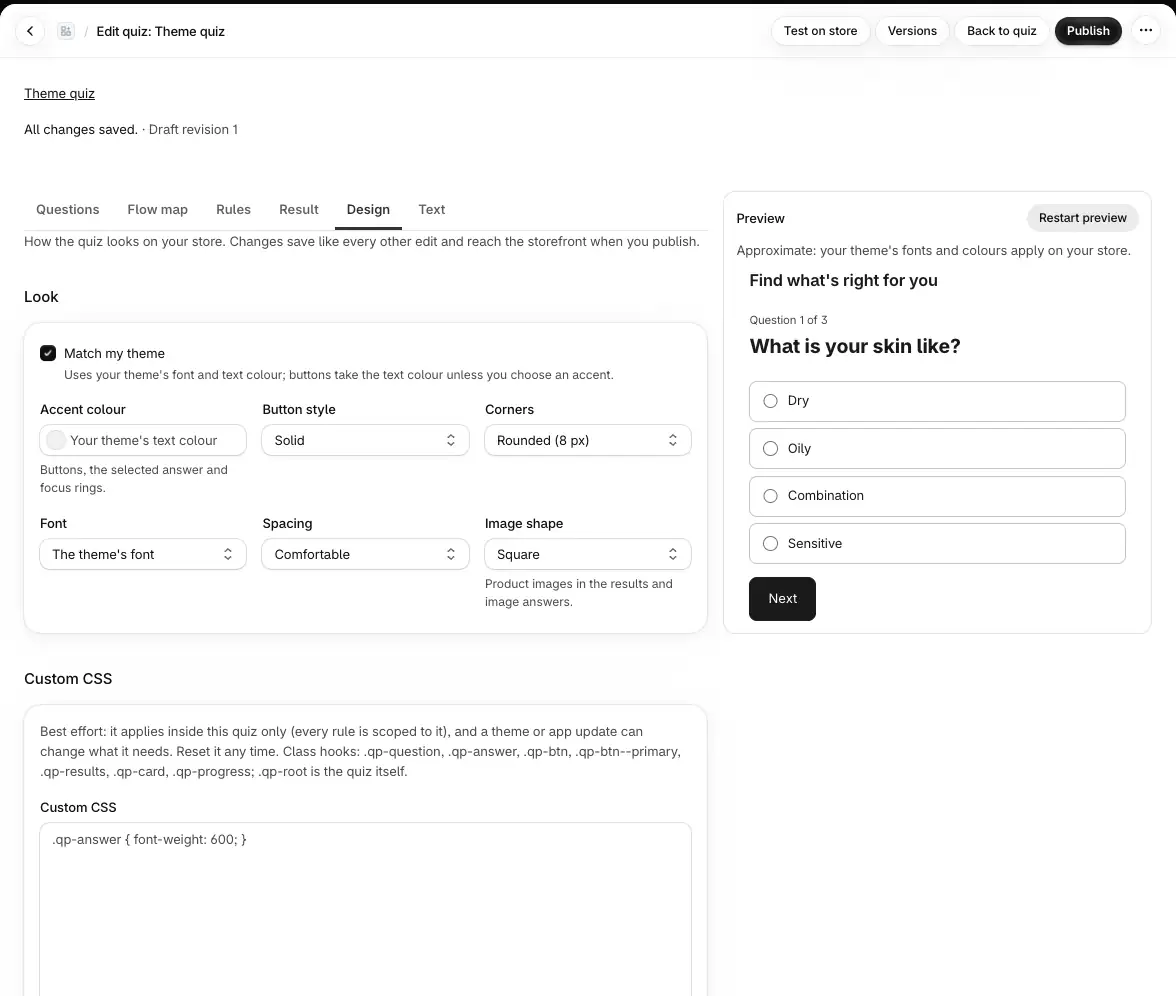
Go to Quizzes, open the quiz and choose Edit questions, then the Design tab.
Leave Match my theme ticked to keep your theme's font and text colour. Buttons then take the text colour unless you choose an accent.
Adjust any of these:
Accent colour: buttons, the selected answer and focus rings. Enter a colour like
#1d4ed8.Button style: Solid or Outline.
Corners: Square (0 px), Slightly rounded (4 px), Rounded (8 px) or Very rounded (16 px).
Font: The theme's font or The device's system font.
Spacing: Comfortable or Compact.
Image shape: product images in the results and image answers, Square, Portrait (3:4) or As uploaded.
Check the preview next to the editor, then Publish.
If you untick Match my theme, the quiz uses its own colours (dark text on white), whatever your theme does, and the system font unless you set Font to The theme's font.
A popup opens on a white panel with dark text. The quiz inside it follows the Design tab.
Custom CSS#
For anything the settings don't cover, the Custom CSS box on the Design tab takes your own CSS. It applies
inside this quiz only: Quizproof scopes every rule to the quiz, so nothing else on your store changes. Class hooks:
.qp-question, .qp-answer, .qp-btn, .qp-btn--primary, .qp-results, .qp-card, .qp-progress, and
.qp-root for the quiz itself.
Quizproof checks the CSS as you type and lists any rule it drops, with its line number. Every rule applies, scoped to this quiz. means it's all fine.
Images and fonts must come from
cdn.shopify.com. To use a font your theme doesn't have, upload it to your store's files in the Shopify admin and load it with@font-face.The limit is 10 KB after scoping. Over that, none of it applies and the quiz can't be published until it's shorter.
Reset CSS clears it.
Custom CSS is best effort: a theme or app update can change what it needs, and support can't write custom CSS for you.
Change the text shoppers read#
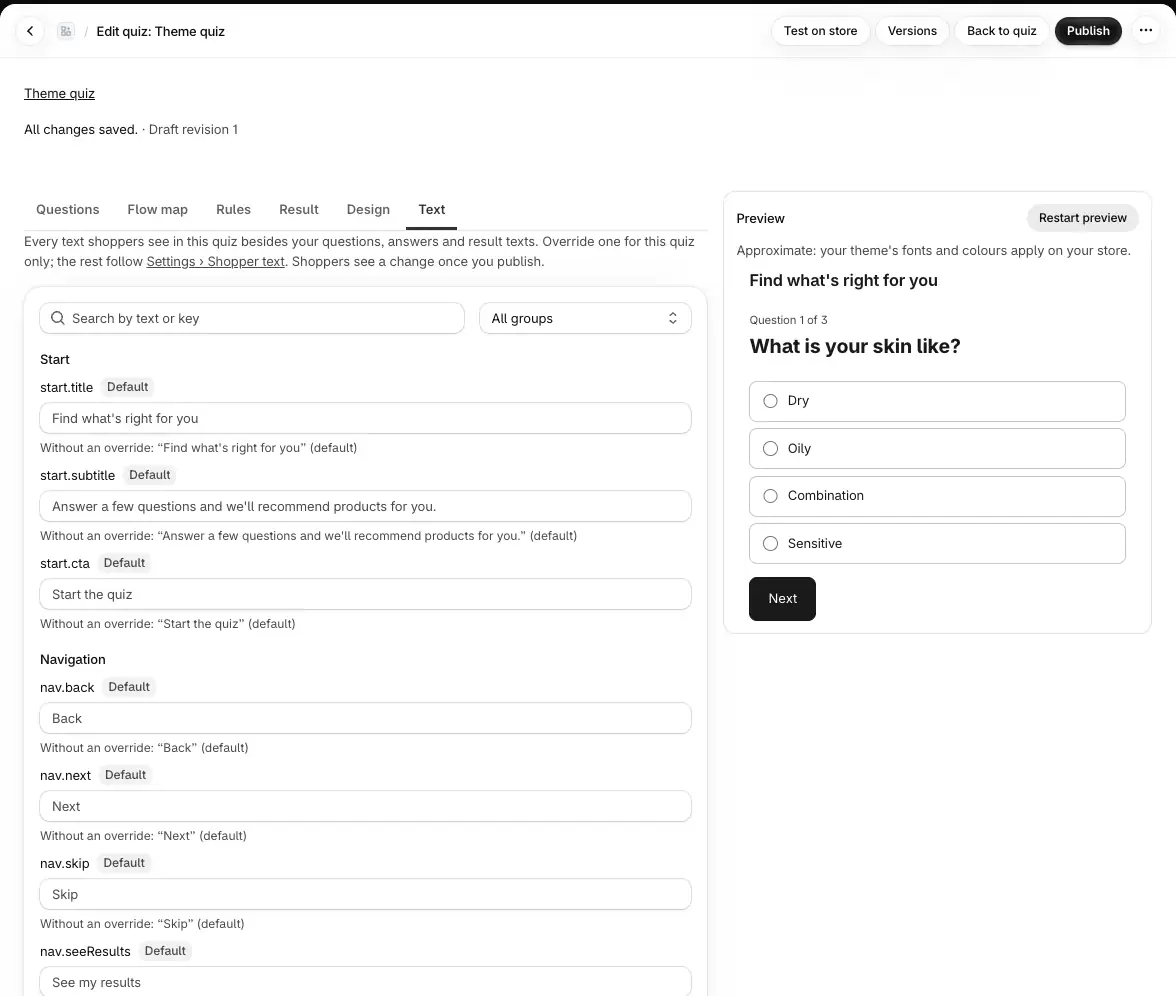
Your questions, answers and result texts are edited on the Questions and Result tabs. Everything else shoppers read (buttons such as See my results, progress, the no-match message, opt-in wording, errors, the results email) has a default you can change in two places:
Settings › Shopper text sets the default for every quiz.
The editor's Text tab overrides it for one quiz.
Each line shows its source: Default, Shop default or This quiz. Type to override; Reset to default goes back. Search or pick a group (Start, Navigation, Questions, Results, No match, Cart, Opt-in, Errors, Unavailable, Results email) to find a line.
Text in braces, like {count} in "We found {count} products for you", is filled in for each shopper. Keep the
placeholders a line needs; an unknown or missing one shows an error and the quiz can't be published. Each text is
plain text, up to 500 characters.
Live quizzes keep their text until republished#
A change in Settings › Shopper text reaches a quiz the next time it's published. When live quizzes would show different text, the page offers to republish them ("Republish 2 live quizzes to apply", with your count). A quiz with unpublished edits isn't republished for you; publish it from its editor when it's ready.
The "Powered by Quizproof" link#
On the Free plan, a small "Powered by Quizproof" link shows under the quiz. There is no setting to edit or hide it; it goes away on any paid plan. See plans and limits.
What isn't available yet#
One set of shopper text per store: there is no per-language translation yet.
No design presets to copy between quizzes: set each quiz's Design tab.
If it doesn't work#
My change doesn't show on the store. Design and text changes reach shoppers only after Publish. A Shopper text change also needs the quiz republished.
The buttons look washed out or invisible. Your theme's text colour is used for buttons. Choose an Accent colour.
Part of my CSS is ignored. The Design tab lists each dropped rule and why: rules for
body,htmlor:root, images from other sites,position: fixedon the quiz.
Related#
Placing your quiz (the Quiz button's label and style are set in the theme editor)
Questions? Email support@quizproof.app.
Menu paths such as Settings › Privacy are inside Quizproof: in your Shopify admin, open Apps › Quizproof. Where an article means Shopify's own settings, it says so.
Something unclear? Email support@quizproof.app. We aim to reply within 1 business day.
More in Building quizzes: Connect your product data to a template, Draft a quiz with AI, Questions, answers and branching, How Quizproof chooses products: rules, Preview, test, publish and roll back